
We Printed 5,000 Brochures. The QR Code Was Already Dead.

Five thousand brochures. Spot UV finish. The kind that costs real money and feels substantial in your hand. On the back cover, a QR code pointing to a campaign landing page.
They went out at a regional trade show on a Thursday. By Saturday, half the QR codes were dead. The free tool we'd used had a policy nobody read: dynamic links expire after 30 days on the free tier. The brochures were printed three weeks before the show. The math was not in our favour.
We found out because a prospect told us. Not our team. A prospect, standing at our booth, pointing at their phone screen.
That was the moment I stopped treating these tools as afterthoughts.
The Stack We Obsess Over — And the Gaps We Don't
Every serious marketing conversation starts in the same place. Email automation. CRM. Social scheduling. AI content generation. These tools get the budget presentations, the vendor demos, and the month-long evaluation cycles. Rightly so. They are the engine.
But engines need more than cylinders. They need the small parts that nobody discusses until one of them fails.
There are five tools that every marketing team reaches for constantly — at events, during campaigns, across borders, in planning, in execution. Five tools that almost every team sources from wherever they can find them on any given day, with no consistency, no security vetting, and no integration with anything else in the stack.
This is the story of what happens when those gaps catch up with you — and why closing them is simpler than you think.
1. QR Code Generator
You already know the brochure story. But the more common version is quieter. A team member Googles "free QR code generator," picks the first result, creates the code, and drops it into the artwork file. Job done. Nobody asks: is this static or dynamic? What happens if the destination URL changes? What happens when the free tier hits its limits?
Static QR codes are permanent but inflexible. Change the URL and the code becomes a dead end. Dynamic codes let you update the destination after printing, but most free tools put that behind a paywall or a time limit. By the time you discover which kind you have, it is usually too late.
Then there is the tracking question. A QR code on printed collateral is a channel. It should have analytics. How many people scanned it? From which city? On which day? If you cannot answer those questions, you do not have a QR code — you have a decorative square.
What changes when your QR code generator lives inside your Marketing OS
Every code is dynamic. Every code is tracked. Every code carries your brand. And when a destination URL changes — which it will — you update one field, not the print run. No reprints. No booth conversations you would rather not be having.
2. URL Shortener
A colleague once sent a campaign link via text message to a prospect. The full UTM-tagged URL ran to 180 characters. The prospect replied: "Is this a phishing link?"
It was not. But it looked like one. Long, parameter-heavy URLs erode trust in a way that is easy to dismiss until it costs you a conversion.
A URL shortener solves the obvious problem — it makes links readable and shareable. But that is table stakes. The real value is what sits behind the short link: click-through data, device breakdown, geographic distribution, time-of-day patterns. Every short link is a measurement instrument, and most marketers leave that data behind because they are using a public free service that does not surface it properly.
Here is the part worth pausing on. Free public URL shorteners may log every URL you submit. Your campaign assets. Your internal documents. Your client-specific landing pages. Paste those into a public tool and you have quietly handed sensitive information to an external service, with no visibility into how it is stored or used.
What changes when your URL shortener lives inside your Marketing OS
Marketing OS short links, click analytics, and no sensitive URLs passing through a third-party server you did not choose and cannot audit. Clean links, clean data, clean conscience.

3. OCR Namecard Scanner
We ran a two-day industry conference. Forty-something people visited the booth. The team collected business cards the old-fashioned way — physically, enthusiastically, with genuine conversations attached to each one.
By the following Monday, eleven cards had made it into the CRM. Eleven. The rest were sitting in jacket pockets, laptop bags, and the bottom of a tote bag. Three were entered with the wrong email address because the handwriting was ambiguous. Two had faded ink nobody could read clearly.
The conference cost tens of thousands of dollars to attend. Eleven leads entered correctly into the system.
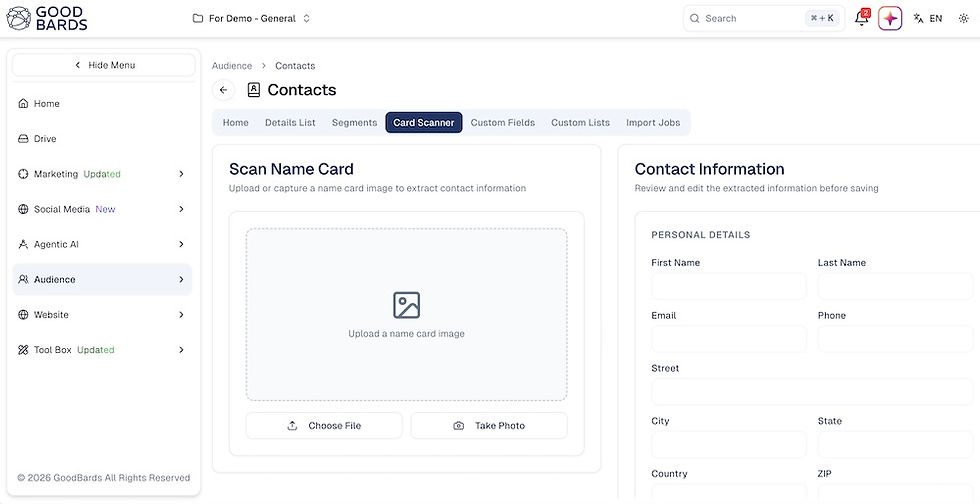
An OCR namecard scanner — optical character recognition applied to business cards — digitises a card in seconds. Name, title, company, email, phone, address: extracted, structured, and ready to sync. No manual entry, no transcription errors, no cards left in a bag until they are no longer relevant.
There is also a data governance issue that most teams overlook. When your team goes looking for a scanning app, they find what is available in the App Store. Many of those apps store scanned contact data on their own servers. The contact information of people who trusted you with it at an event ends up on infrastructure you did not choose and cannot audit. That is a compliance problem dressed up as a convenience feature.
What changes when your namecard scanner lives inside your Marketing OS
Lead capture at events becomes systematic. Every card goes directly into your CRM, in the right format, through infrastructure your organisation controls. The conversation at the booth is the last manual step. Everything after it is automatic.
4. Language Translator
A regional partner sent a campaign brief in Mandarin. Deadline was tight. Someone on the team — acting quickly, acting reasonably — opened a browser tab, pasted the brief into a public translation service, got the gist, and moved on.
The brief contained pricing information, launch timing, and product positioning that had not been announced publicly. All of it now sitting in the input logs of a free tool, potentially feeding training datasets, potentially stored in ways nobody on the team had thought to ask about.
Translation feels informal. It feels like a quick helper, not a workflow with security implications. That is exactly why it is dangerous.
Modern marketing teams operate across languages every day. Regional campaigns, international partners, multilingual content, global vendors — translation is not occasional. It is constant. And like every constant workflow, it deserves a proper home with proper data handling, not a browser tab that nobody audited.
What changes when your language translator lives inside your Marketing OS
Translation happens within your secure environment. Sensitive content stays where it belongs. Localisation becomes part of the campaign workflow, not a detour through a public tool that answers to nobody on your team.
5. Marketing Calendar
Two teams, running independently, both decided the same two-week window was ideal for a campaign push to the same audience segment. One was running paid acquisition. The other was running a re-engagement nurture sequence.
The messages contradicted each other. The offers were at different price points. The audience received both in the same week. Conversion data from both campaigns was permanently muddied.
Nobody was careless. They simply did not have visibility into what the other team was doing, because the marketing calendar was a spreadsheet that one person maintained and nobody else fully trusted.
A marketing calendar sounds like the most basic tool imaginable. It also solves problems that nothing else solves, because the problem is not execution — it is visibility. Who can see what is happening across the entire marketing function, in one place, updated in real time? In most teams, the honest answer is nobody, not really.
When the calendar is disconnected from actual campaigns, it becomes a record of what was planned rather than what is happening. It requires manual updates. It drifts. People stop trusting it, so they stop updating it, so it drifts further. The cycle is familiar to anyone who has tried to keep one alive in a shared spreadsheet.
What changes when your marketing calendar lives inside your Marketing OS
The calendar connects to the campaigns themselves. It updates as campaigns update. Conflicts surface before they happen, not after the brochures are printed or the emails are sent.
The Pattern Underneath All of This
Look at the five situations above. Different tools, different teams, different stakes. But the same pattern underneath every one.
A marketer needed something. The organisation had not provided it. The marketer found the nearest available option. Nobody asked whether it was secure, whether it would last, whether it tracked anything, or whether the data stayed where it was supposed to.
The gap between what marketing teams are given and what they actually need creates a shadow stack — a collection of free tools, random apps, and browser tabs that fills the space where proper tooling should be. That shadow stack is where QR codes go to expire, where lead data goes to drift, and where campaign coordination quietly falls apart.
The answer is not to add more tools. It is to close the gap — by building these essentials into the same environment where the rest of the marketing work already happens.
Good Bards Marketing OS Includes All Five
Good Bards Marketing OS includes an OCR namecard scanner, QR code generator, URL shortener, language translator, and marketing calendar — built into the same platform as your campaigns, content, analytics, and team workflows.
Not because they are flashy. Because your team is going to need them. And the next time they do, we would rather they find them inside your verified stack than in a browser tab nobody approved.
Frequently Asked Questions
What is a QR code generator used for in marketing? A QR code generator creates scannable codes that link to landing pages, product pages, event sign-ups, or any digital asset. It bridges offline and online experiences and is used in print ads, event banners, packaging, and business cards. Dynamic QR codes let marketers update the destination URL after printing, which makes them far more practical for campaigns.
Why do marketers need a URL shortener? A URL shortener creates clean, trackable links that are easier to share, look professional in campaigns, and provide click analytics. Branded short links also improve audience trust in email and SMS. A URL shortener inside a Marketing OS keeps sensitive URLs off public third-party servers.
What is an OCR namecard scanner for marketers? An OCR namecard scanner uses optical character recognition to digitise business cards, extracting contact details automatically and pushing them into a CRM. Marketers use it at events and trade shows to capture leads quickly and accurately, without manual data entry or the risk of losing cards or mistyping contact information.
Why do marketers need a marketing calendar? A marketing calendar provides a shared visual overview of all campaigns, content, events, and deadlines across the team. It prevents scheduling conflicts, aligns cross-functional teams, and ensures that no two campaigns accidentally talk over each other to the same audience at the same time.
Why should a language translator be part of a Marketing OS? A built-in language translator lets marketers localise campaigns and understand foreign-language content without sending data to unvetted public tools. This matters for data security — free translation services may log and store the text you submit, including sensitive campaign briefs, pricing information, or partner communications.


Comments